Skip to content
Skip to breadcrumbs
Skip to header menu
Skip to action menu
Skip to quick search
Spaces
Hit enter to search
Help
Online Help
Keyboard Shortcuts
Feed Builder
What’s new
Available Gadgets
About Confluence
Log in
支持
Space shortcuts
天河官网
Page tree
Browse pages
Configure
Space tools
A
t
tachments (2)
Page History
People who can view
Page Information
Resolved comments
View in Hierarchy
View Source
Export to PDF
Export to Word
Dashboard
…
支持
常见问题
天河THCAD® 2D 常见问题
十一、 尺寸标注
Skip to end of banner
Jira links
Go to start of banner
19. 尺寸标注的文字上有阴影框怎么去掉?
Skip to end of metadata
Created by
admin4
, last modified on
Feb 02, 2026
Go to start of metadata
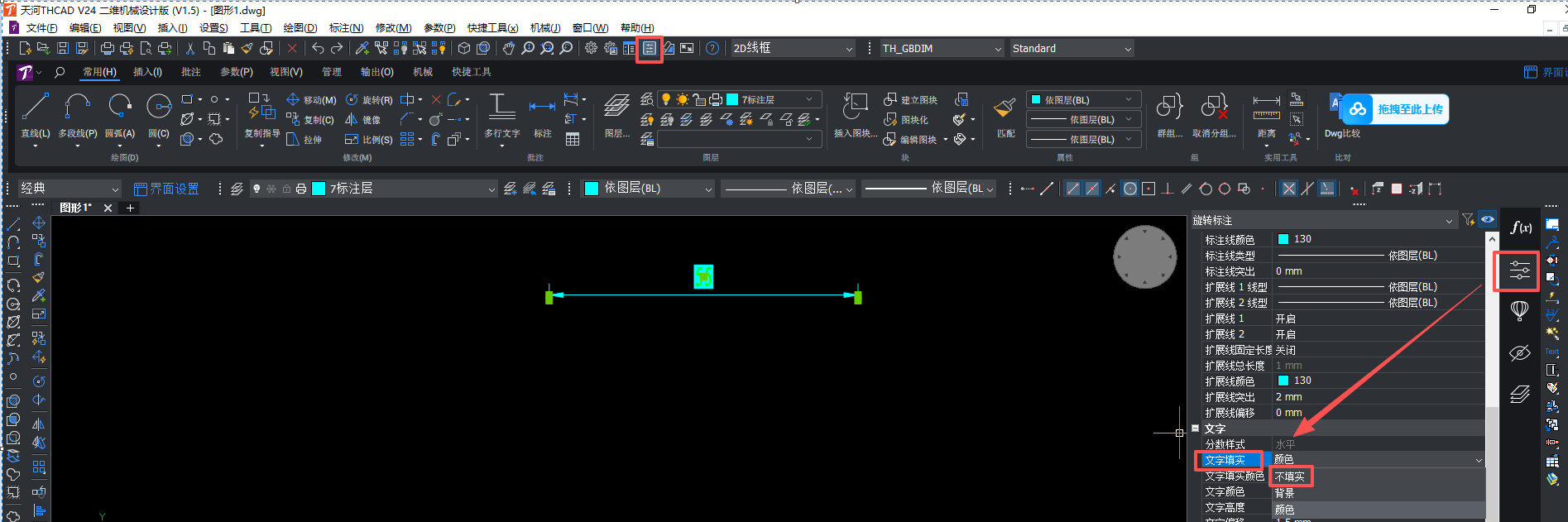
问题描述:如下图所示,尺寸标注的文字上有阴影框。
原因分析:标注的“文字填实”这一项设置的是“颜色”。
调整方法:打开属性面板(ctrl+1),选择尺寸,将“文字填实”这项设置为“不填实”。
No labels
Overview
Content Tools
{"serverDuration": 190, "requestCorrelationId": "0c9dbabb03c0a5a8"}