Skip to content
Skip to breadcrumbs
Skip to header menu
Skip to action menu
Skip to quick search
Spaces
Hit enter to search
Help
Online Help
Keyboard Shortcuts
Feed Builder
What’s new
Available Gadgets
About Confluence
Log in
支持
Space shortcuts
天河官网
Page tree
Browse pages
Configure
Space tools
A
t
tachments (1)
Page History
People who can view
Page Information
Resolved comments
View in Hierarchy
View Source
Export to PDF
Export to Word
Dashboard
…
支持
常见问题
天河PCCAD® for AutoCAD 常见问题
五、界面与显示
Skip to end of banner
Jira links
Go to start of banner
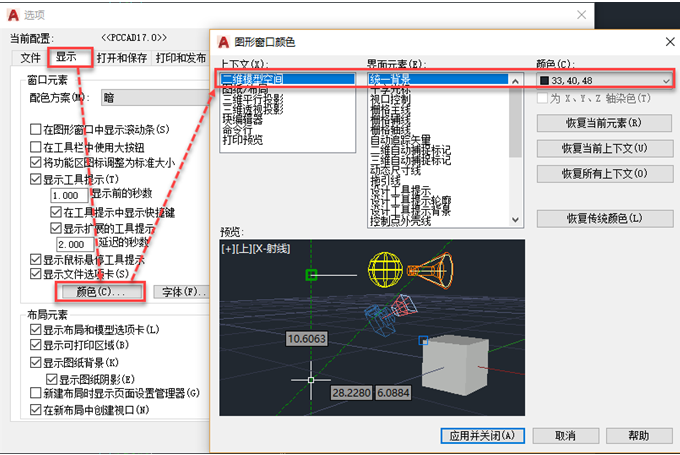
1. PCCAD修改绘图区的背景色
Skip to end of metadata
Created by
admin3
, last modified by
admin1
on
Apr 03, 2026
Go to start of metadata
下拉菜单:工具——选项——显示——颜色。在上下文中选择“二维模型空间”,界面元素为“统一背景”,然后修改颜色即可。
No labels
Overview
Content Tools
{"serverDuration": 73, "requestCorrelationId": "3f26d92697cbf9ea"}