命令: BMBOM,BMBOMPANELOPEN,BMBOMPANELCLOSE
工程物料清单(BOM)是装配中使用的唯一机械零件的列表。在Bricscad的,该列表被表示为表实体(见表),并且可以在图中的任何位置。每个实体都有其自己的序列号(以1开头),名称和出现的次数。
BricsCAD中有三种BOM表类型:
顶级:仅包含顶级组件。顶层零部件是直接插入到主装配体中的零部件。这种BOM表仅列出主要组件,而没有子组件的详细信息。
底层:仅包含底层组件(部件)。底层零部件是不包含其他零件或子装配体的零件。这种BOM表列出了主装配体中的所有零件,无论零件属于哪个零件。
层次结构:包含所有组件,其子组件直接在下面列出。子组件的序列号是由点分隔的数字序列(例如,“ 1.2.3”)。此BOM表类型显示装配体的层次结构。
笔记 | 该BOM状态这部分包括在物料清单属性控制。BOM表中组件的级别是根据所有相关组件的BOM状态设置的。例如,具有终端BOM表状态的零部件始终被视为底层零部件,即使它包含其他零件或子装配体也是如此。 |
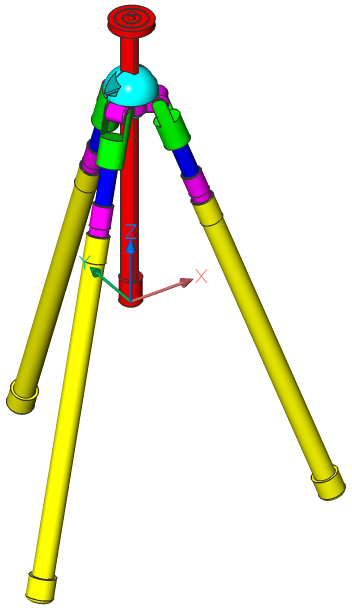
示例:三脚架组装
类型 | 物料清单 |
| 顶层 | 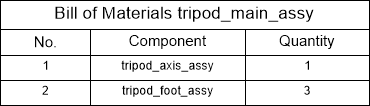 |
| 底层 | 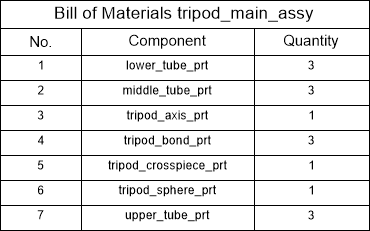 |
| 分层的 | 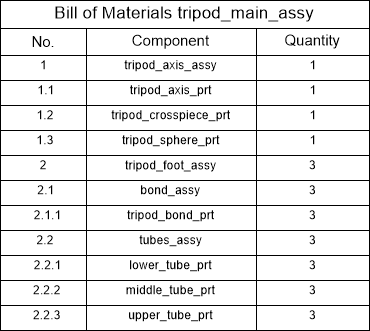 |
对于分层BOM表,支持两种计数模式:
例如,主三脚架组件包含3个三脚架支脚组件。三脚架脚组件的每个实例都包含1个Bond组件和1个Tube组件。
如果计数模式设置为Count all instance,则结果为:
| 物料清单三脚架装配(所有实例都包括在内) | ||
| 不。 | 成分 | 数量 |
| 1个 | 三脚架组装 | 1个 |
| 1.1 | 三脚架脚组件 | 3 |
| 1.1.1 | 债券组装 | 3 |
| 1.1.2 | 管件组装 | 3 |
如果计数模式设置为“在父组件中计数实例”,则结果为:
| 物料清单三脚架装配(每个零件的实例数) | ||
| 不。 | 成分 | 数量 |
| 1个 | 三脚架组装 | 1个 |
| 1.1 | 三脚架脚组件 | 3 |
| 1.1.1 | 债券组装 | 1个 |
| 1.1.2 | 管件组装 | 1个 |
为默认值的计数模式是计数在父组件的实例。您可以在BOM表管理器中或使用BMBOM命令来更改计数模式。
笔记 | 在BricsCAD V20.2之前,默认情况下,所有层次BOM表都使用“计数所有实例”模式。在BricsCAD V20.2或更高版本中更新此类表时,默认模式设置为计数父组件中的实例。这可能导致某些零件的数量不同。如有必要,在BOM表管理器中手动设置计数模式。 |
默认情况下,分层物料清单显示模型中的所有级别。使用最大级别属性可以将层次化BOM限制到特定级别。设置最大级别时,仅包括该级别的零件。例如,如果最大级别= 2,则仅列出顶级组件和直接包含在顶级组件中的子组件。
默认情况下,BOM表包含“数量”,“名称”和“数量”列。
使用BmBom命令的Configure选项,您可以添加更多列,例如Description,Density,Volume,Mass,Material,Thickness(对于钣金零件)和Parameters(对于参数化零件)。
可以将组件,实例或块引用的任何内置属性添加到BOM表。使用DataExtraction技术还支持自定义评估列。
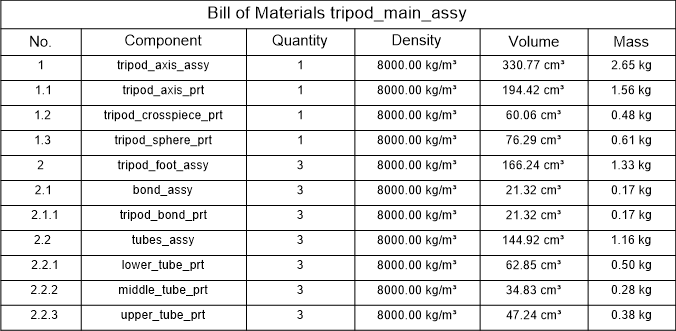
具有密度,体积和质量的BOM。
BOM表仅列出了唯一的组件;根据分组模式,将相同组件的多个插入分组。
从BricsCAD V21开始,支持以下分组模式:
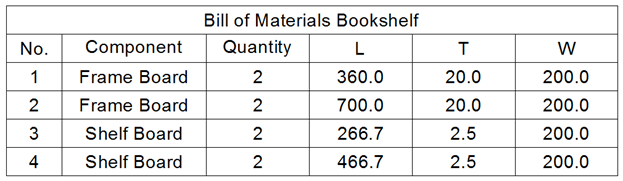
It is possible to make any column in the BOM table invisible. Invisible columns will not appear in the table in the document. However, you still can use these columns in formulas. Invisible columns will also be displayed in the BOM Manager.
Starting from BricsCAD V21, it is possible to set an aggregate function to almost every column in top- or bottom-level BOM tables. Aggregate functions group values of several rows in BOM (that differ only in those values) into one single value. Following aggregate functions are supported:
For example, take the following BOM table:
| Component | Width | Length | Height | 数量 |
| 光束 | 16 | 250 | 10 | 1个 |
| 光束 | 16 | 200 | 10 | 2个 |
| 光束 | 16 | 220 | 20 | 1个 |
| 光束 | 20 | 215 | 20 | 3 |
| 光束 | 20 | 225 | 20 | 1个 |
并将一个聚合函数应用于“长度”列。下表中汇总了结果:
| 成分 | 宽度 | 高度 | 长度(总和) | 长度(平均) | 长度(最小) | 长度(最大) | 长度(连接) | 长度(与计数连接) |
| 光束 | 16 | 10 | 650 | 216.6667 | 200 | 250 | 200; 250 | 2x200;250 |
| 光束 | 16 | 20 | 220 | 220 | 220 | 220 | 220 | 220 |
| 光束 | 20 | 20 | 870 | 217.5 | 215 | 225 | 215; 225 | 3x215; 225 |
对于“与计数连接”列,可以:
如果在求值列中使用了聚合列,则默认情况下将使用最终值。但是,可以将聚合函数应用于求值列。在这种情况下,将首先针对所有原始值(在合计之前)计算此类评估列的结果,然后将合计结果值。
数字列是用于枚举行的特殊列。它自动为BOM表中的所有行分配编号,而无需跳过,并且独立于其他表。行从1开始编号。
可以更改数字列的以下设置:
对于分层BOM表,可以使用以下设置:
通常,BmBalloon命令使用数字列作为源来注释工程图。但是,表中的任何列都可以通过更改其角色而用作注释气球的源。可以使用以下列角色:
只有一列可以具有“数字”,“名称”或“数量”角色。如果没有列分配有这些角色之一,则无法进行自动注释。

By default, the width of each column is set automatically, so its content fits without additional line breaks. However, it is possible to set a fixed column width.
To set the column width, do one of the following:
To restore the automatic width mode, select the column in the BOM manager and select Auto in the drop-down list for the Width property .

You can format column values. Select the required column in the BOM manager and choose the Format option in the context menu. Define the desired format in the Format dialog. The available settings depend on the data type of the selected column. You can select multiple columns of the same type to format them equally.
Because BOM tables use DataExtraction technology, you can list properties of mechanical components and entity properties, for example block references in BOM tables.
However, these properties are not always necessary. In large assemblies, these properties could negatively affect performance. This is because BricsCAD caches properties during BOM table creation.
Property sets are built-in sets of properties. You can choose the most optimal set of properties for your needs. Currently, the following property sets are supported:
You may change the property set for a BOM table in the BOM Manager or use BMBOM when you add a new table.
It is possible to filter parts that will form the Bill of Material. Starting with BricsCAD V21, there are two filter types: main and column.
A Main filter works in the same way as the DataExtraction command: First, all parts in the assembly, at the required level (top, bottom or hierarchical), are matched against the filter expression. Then, only those parts that have passed the filter will be included in the BOM.
The filter expression may not refer to BOM columns because filtering is done before the BOM is generated. For example, it is possible to create a filter for all standard parts because Is standard is a normal property of the component. However, it is not possible to set the main filter to filter out all parts with a quantity greater than 1; you should use Column filters for that.
The easiest way to configure the main filter is to use the Filter Configurator in the BOM manager.

过滤器配置器允许定义一组条件。每个条件都定义了所选属性和目标值之间的关系。可能的关系为“等于”,“不等于”,“小于”,“大于”,“小于或等于”和“大于或等于”。可以将条件添加到组中,该组定义了应如何处理这些条件。有两种组类型:
一个组可以包含任意数量的条件。它还可以包含嵌套组,从而使复杂的过滤器成为可能。
要添加条件:
对于文本值,“等于”和“不等于”关系支持通配符。
Filter Configurator会自动将条件集转换为一个过滤器表达式,可以通过按下 按钮将其显示为:

此表达式是完全可编辑的,并且与条件集有双向关联。
关系运算符:
| 操作员 | 意义 |
| == | 等于 |
| != | 不等于 |
| < | 少于 |
| > | 比...更棒 |
| <= | 小于或等于 |
| > = | 大于或等于 |
For example, to get a BOM of all standard parts, use the following expression:
"Is standard"=="Yes"
To get a BOM of all ISO standard parts, use the following expression:
"Is standard"=="Yes" and "Part standard"=="ISO"
To get a BOM of all ISO or DIN standard parts, use the following expression:
"Is standard"=="Yes" and ("Part standard"=="ISO" or "Part standard"=="DIN")Wildcard characters allow you to match property values against a specific template. For example, if you want to find all components containing "nozzle" in their names, a following expression could be used:
"Component name"=="*nozzle*"
Wildcard characters can be also used as target values in the Filter Configurator.
Only "Equal to" and "Not equal to" relational operators support wildcard characters. Note that wildcard characters in the main filter are case-sensitive. For Column filters, you can specify if you need case-sensitive or case-insensitive matching.
The following special symbols are supported:
| Name | Character | Description |
| Back quote | ` | Escapes the next character (takes it literally). |
| Comma | , | Separates patterns. |
| Asterisk | * | Matches any character sequence, including a null sequence, anywhere. |
| Question Mark | ? | Matches a single character. |
| Period | . | Matches a single non-alphanumeric character. |
| At sign | @ | Matches a single alphabetic character. |
| Hash tag | # | Matches a single numeric character. |
| Tilda | ~ | If the first character in a pattern matches anything but the pattern. |
| Brackets | [...] | Matches a single enclosed character. |
| Tilda brackets | [~...] | Matches a single non-enclosed character. |
| Hyphen | - | In brackets, matches a single character in the specified range. |
Column filters have been introduced in BricsCAD V21. This allows you to quickly set the conditions which rows display, depending on the column content (somewhat similar to filters in some spreadsheet processors). Unlike the main filter, they are applied after the BOM table has been generated. Therefore, it is possible to use column filters for columns with aggregated content, such as quantities.
Each column can have one filter only; however, you can add column filters to as many columns as you need. Only rows that pass all column filters display in the final BOM.
您可以使用BOM表管理器中的“列过滤器”对话框来配置列过滤器:

在此对话框中,您可以从列表中选择过滤器的类型并进行相应的配置。可能的过滤器列表取决于列内容类型,如下表所示:
| 过滤器类型 | 列类型 | 描述 |
| 一直被接受 | 任何 | 接受所有列值 |
| 等于 | 数值的 | 值应等于目标值一 |
| 不等于 | 数值的 | 值应不等于目标值一 |
| 少于 | 数值的 | 值应小于目标值一 |
| 比...更棒 | 数值的 | 值应大于目标值1 |
| 小于或等于 | 数值的 | 值应小于或等于目标值1 |
| 大于或等于 | 数值的 | 值应大于或等于目标值1 |
| 之间 | 数值的 | 值应在给定范围内,包括两端 |
| 不在范围内 | 数值的 | 值应不在给定范围内,两端不包括在内 |
| 完全匹配 | 文本 | 值应与目标值完全匹配 |
| 不匹配 | 文本 | 值应与目标值不同 |
| 以。。开始 | 文本 | 值应以给定的文本开头 |
| 不以 | 文本 | 值不应以给定的文本开头 |
| 以。。结束 | 文本 | 值应以给定的文本结尾 |
| 不以 | 文本 | 值不应以给定的文本结尾 |
| 包含 | 文本 | 值应包含给定的文本 |
| 不含 | 文本 | 值不应包含给定的文本 |
| 匹配模式 | 文本 | 值应与给定的通配符模板匹配 |
| 与模式不符 | 文本 | 值应与给定的通配符模板不匹配 |
| 在 | 文字和数字 | 值应在给定的一组值中 |
| 不在 | 文字和数字 | 值不应该在给定的值集中 |
For all text filters, you can also specify whether they should be case-sensitive or case-insensitive.
There are three sorting modes for BOM tables:
Starting from BricsCAD V21, BOM tables use so-called "natural sorting" of text. It means that if text contains a mix of letters and numbers, it will be sorted with respect to those numbers. For example, strings "N1", "M2", "N11", "N2", "AA1" will be sorted as "M2", "N1", "N2", "N11", "AA1." Therefore, it is possible to assign custom numbers with various prefixes to components using custom parameters, and then sort the BOM tables by those numbers in the correct order.
Evaluated columns are special columns, of which results are depending on other columns using user-defined expressions. Since BricsCAD V21, two kinds of evaluated columns are supported: formula and template columns.
A Bill of Materials supports formula fields. The same syntax is used in the DataExtraction command. FormulaExpression is the expression in the format of \AcExpr formula fields. This can contain constants such as PI or functions such as SIN (see Use Expressions). An operand in an expression can be a ColumnTitle enclosed in arrow brackets (<>).
For example, formula =<Mass>/<Volume> calculates the average density of the component.
If a row does not contain a value, a default value will be used instead. It is possible to specify the default value for an operand using the following syntax:
<"ColumnTitle",DefaultValue>
where ColumnTitle is the title of the required column, and DefaultValue is the default value. ColumnTitle must be between double quotes ("). If no default value is specified, an empty value will be used, which in most cases results in an empty output.
A formula column can contain multiple expressions. Each expression should be enclosed by sum brackets ({}). These expressions will be evaluated from first to last, and the first one yielding a non-empty output will be used.
Starting from V21, a formula can refer to other formula columns, provided that they do not form a loop. In a hierarchical BOM, a formula can also refer to values of the parent row by adding Parent: before the column name. It also can refer to properties that are not explicitly added to the table, but all other formula columns referred to in the formula must exist in the table. You can still such columns displayed as invisible in the BOM table in formula expressions.
For distance, area, volume and mass properties, the values will be converted to the user-defined unit before using them in the formula expression. If the user-defined unit is not set, the document unit will be used. For the mass property, kilogram will be used in metric documents and lbs (pound) in imperial documents.
Template columns allow you to combine several properties, as well as a custom text, into a single column. A special syntax, based on Diesel expressions, is used to define template columns. Expressions for template columns must start with the $ sign. An operand in an expression can be a ColumnTitle enclosed in arrow brackets (<>). It is also possible to use special functions:
| $(+, arg1, arg2[, ... , arg9]) | 将提供的参数添加到第一个 |
| $(-,arg1,arg2 [,...,arg9]) | 从第一个中减去提供的参数。 |
| $(*,arg1,arg2 [,...,arg9]) | 将第一个参数乘以提供的参数。 |
| $(/,arg1,arg2 [,...,arg9]) | 将第一个参数除以提供的参数。 |
| $(=,arg1,arg2) | 如果arg1等于arg2,则返回1;否则,返回1。否则,返回0。arg1和arg2都必须是数字。 |
| $(<,arg1,arg2) | 如果arg1小于arg2,则返回1;否则返回1。否则,返回0。arg1和arg2都必须是数字。 |
| $(>,arg1,arg2) | 如果arg1大于arg2,则返回1;否则返回1。否则,返回0。arg1和arg2都必须是数字。 |
| $(!=,arg1,arg2) | 如果arg1不等于arg2,则返回1;否则返回1。否则,返回0。arg1和arg2都必须是数字。 |
| $(<=,arg1,arg2) | 如果arg1小于或等于arg2,则返回1;否则,返回1。否则,返回0。arg1和arg2都必须是数字。 |
| $(> =,arg1,arg2) | 如果arg1大于或等于arg2,则返回1;否则返回1。否则,返回0。arg1和arg2都必须是数字。 |
| $(and,arg1,arg2 [,...,arg9]) | 对参数应用按位AND运算 |
| $(angtos,angle [,mode,precision]) | 相对于给定模式(0-度,1- d / m / s,2-渐变,3-弧度)和精度将角度转换为字符串。 |
| $(delim,delimiter_string) | 插入智能定界符。仅当此分隔符前后的输出不为空时,分隔符字符串才会添加到输出中。 |
| $(编辑时间,时间,格式) | 根据给定的格式字符串格式化日期。 |
| $(eq,arg1,arg2) | 如果arg1等于arg2,则返回1;否则返回1。否则,返回0。arg1和arg2都必须是文本。 |
| $(eval,表达式) | 将给定表达式评估为Diesel表达式。 |
| $(固定值) | 将实际值截断为整数1。 |
| $(getvar,变量) | 返回给定系统变量的值。 |
| $(if,arg,then [,else]) | 如果'arg'不为0,则返回'then'。否则,返回'else'或空字符串(如果未提供'else'的话)。 |
| $(索引,位置,逗号分隔的字符串) | 返回给定逗号分隔字符串中给定位置的子字符串。 |
| $(nth,position,arg1 [,arg2,...,arg9]) | 返回给定位置的参数。 |
| $(或arg1,arg2 [,...,arg9]) | 对参数应用按位或运算。 |
| $(rtos,value [,模式,精度]) | 根据所需的模式和精度设置给定值的格式。 |
| $(strlen,字符串) | 返回给定字符串的长度。 |
| $(substr,string,start [,length]) | 从给定的“长度”的“开始”返回“字符串”的子字符串。计数从1开始。 |
| $(大写,字符串) | 将“字符串”转换为大写。 |
| $(xor,arg1,arg2 [,...,arg9]) | 对所有参数应用按位XOR。 |
一个模板列可以包含多个表达式。每个表达式都应用和括起来({})。这些表达式将从头到尾进行评估,并且将使用第一个产生非空输出的表达式。
Starting from V21, a template column can refer to other evaluated columns, provided that they do not form a loop. In a hierarchical BOM, a template column can also refer to values in the parent row by adding Parent: before the column name. It can also refer to properties that are not explicitly added to the table, but all other evaluated columns referred to in any of the expressions must be present in the table. You can still use columns displayed as invisible in the BOM table in template expressions.
You can use "\n" string to add a line break.
For example, the following expression combines PartNumber, Width, Height and Length properties:
${<PartNumber>$(delim," X ")<Width>$(delim," X ")<Height>$(delim," X ")<Lenght>}You can use the Expression configurator dialog to configure an evaluated column. This dialog is available in Bill of Materials Manager.

This dialog allows you to set the title and unit for the column, edit the expression using an editor with syntax highlight and autocompletion, and see a of the BOM table with the evaluated column. For a template column, the Template section allows you to easily insert, move and delete properties, as well as delimiters and custom texts.
You can adjust the units placement mode for columns that have associated units. The following options are available:
您可以为距离,面积,体积和质量值设置单位模式,以定义用于显示特定值的单位。例如,如果质量从1克到几吨不等,则为每个值选择“最佳”以显示转换为最合适质量单位的每个质量。要查看所有质量(以千克为单位),请将千克设置为该列的用户定义单位。默认值是所有值的最佳值。
单位模式选项:
笔记 | 如果为列设置了用户定义的单位,并且该列在公式字段中使用,则转换为该单位的值将替换为公式。否则,将使用文档单元。 |
材料明细表表支持页脚。要定义哪些列将构成页脚,请为所需的列设置页脚类型:
如果所有列的页脚类型均为No footer,则不显示页脚行。
您可以将BOM表配置另存为模板,并使用它来创建新的BOM表。模板文件包含所有必需的数据。它包括表类型,标题,过滤器和具有所有关联属性的列集。您可以将标题中的<NAME>用作程序集实际名称的占位符。例如,如果您的部件名称为“我的部件”,并且BOM表的标题被指定为<NAME>的材料明细表,则BOM标题将为“我的部件的材料明细表”,因为“我的部件”将被替换<NAME>。
默认情况下,BOM模板文件的扩展名为.BOM。
BOM表模板文件是数据提取定义文件(.dxd)的扩展。但是,您不能将.dxd文件用作BOM表模板,因为某些BOM表特定的数据将丢失。您不能使用.BOM文件来定义DataExtraction模板。
您可以在任何文本编辑器中编辑模板文件。但是,Bricsys建议使用BMBOM命令或BOM表管理器来创建和编辑模板文件。
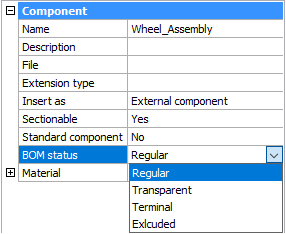
每个组件都有一个BOM表状态属性。您可以使用它来控制“物料清单”表中组件的行为。此属性可以具有以下值之一:
常规-零件出现在材料明细表中与装配体结构相同的位置,并且是材料明细表所选模式的默认值。
透明-组件充当其子组件的透明容器。组件不会出现在材料明细表中,但是子组件可以出现在BOM表中,这取决于它们的BOM表状态,在装配结构中的位置以及BOM表的模式。
终端-该组件被视为叶组件(没有子组件)。这对于复杂零件或标准组件很有用。
排除-组件及其子组件未出现在材料明细表中。
打开包含组件的文件。
在“机械浏览器”中选择根组件。
设置BOM表状态属性。
在机械浏览器中选择组件。
右键单击所选节点以打开上下文菜单。
从“ BOM状态”子菜单中选择一个“ BOM状态”。
笔记 | 无法通过上下文菜单为插入外部组件的本地组件设置BOM表状态。为此,您必须打开包含本地组件的组件。 |
从BricsCAD V21开始,可以将桌子的任何角设置为固定的。BOM更新期间,固定角将始终保持其初始位置。手动移动桌子后,将保留该角的新位置。固定的角允许将BOM表与其他对象对齐。
您可以通过BmBom命令或BOM表管理器选择在放置表期间要固定的角点;使用Tab键循环拐角。您可以在BOM表管理器中更改BOM表的固定角。