...
Rhinoceros3D是由美国华盛顿西雅图的Robert McNeel&Associates开发的3D建模器。Rhino用于创建,编辑,分析,记录,渲染,设置动画和转换NURBS *曲线,曲面,实体,点云和多边形网格。Grasshopper是一种视觉编程语言环境,可在Rhinoceros 3D计算机辅助设计应用程序中运行。它与Rhino的3D建模工具紧密集成。
安装Rhino / Grasshopper连接
- 从https://www.rhino3d.com/download下载Rhino 7 。
注意:自PCCAD V21和Rhino 7发行以来,您可以在PCCAD中使用Rhino / Grasshopper连接,同时具有PCCAD BIM V21和Rhino 7的试用许可证密钥。旧版本的Rhino的密钥不适用于此集成。 - 从PCCAD应用商店下载Grasshopper-PCCAD连接:httpsPCCAD连接:https ://www.bricsys.com/applications/a/?rhino-grasshopper-connection-for-PCCAD-a1353-al2360 。安装程序将所有必需的文件复制到“ Program Files \ Bricsys \ Grasshopper-PCCAD Connection”文件夹。
注意:“应用程序商店”中当前可用的Grasshopper-PCCAD连接仅在PCCAD BIM V21中有效,而在较早版本中则无效。 - 重新启动PCCAD V21。
- 要启动Grasshopper或Rhino,请打开并保存新图形。然后使用功能区中显示的新选项卡中的按钮或使用Quad启动的按钮。
...
The code for the Rhino/Grasshopper Connection is 100% open-source and is available at https://github.com/Bricsys/rhino.inside-PCCAD. This allows you to fully customize your Connector by coding to your heart's content (assuming, of course, that you know how to code).
...
- Add the 'Start_3.ghx' code to the canvas.
- You do that by downloading the zip file at the bottom of this page and extracting its content.
- Then open the 'Start_3.ghx' file by going to File > Open Document... in your Grasshopper window.
- You can now select all of the Grasshopper code by hitting Ctrl+A on the keyboard and copy it using Ctrl+C.
- Then switch back to the document you were working on in the previous procedure by going to the upper right corner of the Grasshopper window and clicking on the title of the current document (Start_3).
- You then get a drop-down of all the active Grasshopper scripts, so open 'End_2.ghx'.
- Now click on the canvas and hit Ctrl+V to paste the 'Start_3.ghx'-code.
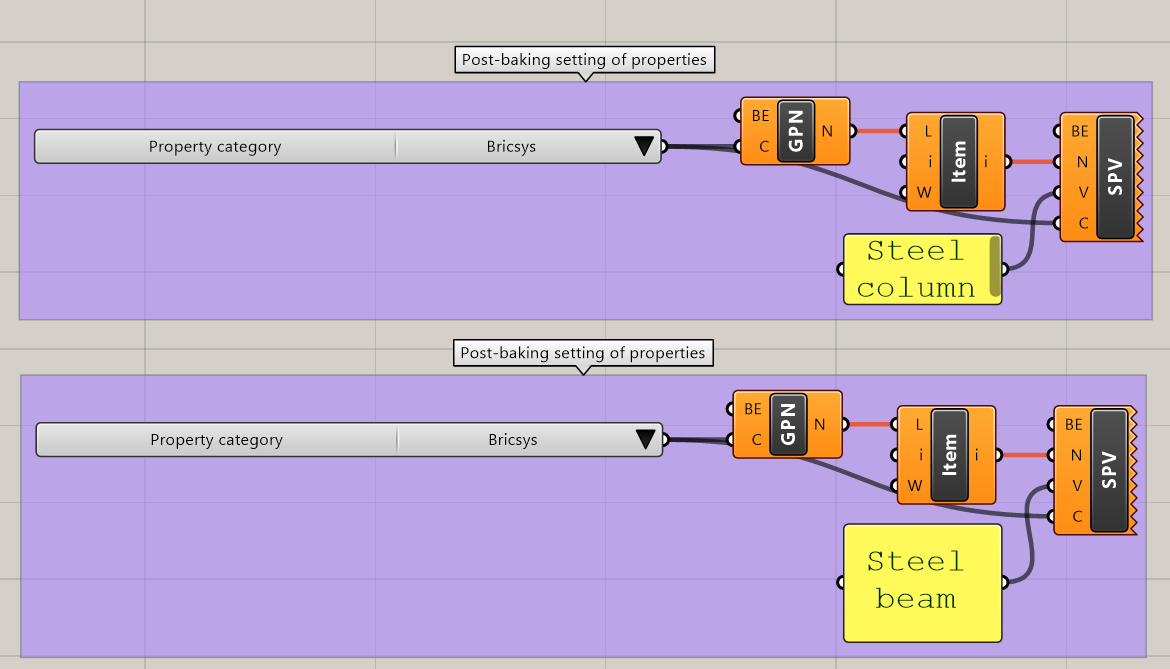
- This code has some post-baking settings of classified and baked beams and columns:
- The script uses the Get Properties Names component to display the BIM properties in the Property Category 'Bricsys'.
- In those properties, it selects item 1 for the columns and item 0 for the beams, 'ColumnType' and 'BeamType' respectively.
- To conclude, it sets the properties to the value specified in the Panel components, using the Set Property Value components.
- To make the script work, bake the two Bake Building Element components that make up the railing.
- Now link the Building Element output of the Bake Building Element components to the respective Building Element input of the Get Properties Names components.
- 同样,将“烘焙建筑元素”组件的“建筑元素”输出链接到“设置属性值”组件的相应“建筑元素”输入。
- 如果现在在PCCAD中选择一列并打开其属性,则ColumnType将设置为“钢柱”。当您更改面板组件的值时,PCCAD中的属性会实时更改。
- 结果脚本:“ End_3.ghx”可在此页面底部的zip文件中找到。它可以与“ End_3.dwg”文件一起使用,在该文件中没有任何内容。烘焙所有建筑元素,以获取烘焙后设置。

Grasshopper中的PCCAD工具集
图标 | 姓名 | 描述 |
| 飞机 | 在PCCAD中表示飞机。 |
| 观点 | 表示PCCAD中的一个点。 |
| 曲线 | 表示PCCAD曲线。 |
| 实体 | 代表PCCAD实体。 |
| 边缘 | 表示PCCAD边。 |
| 脸 | 表示PCCAD面。 |
| 顶点 | 表示PCCAD顶点。 |
| 建筑物 | 为PCCAD中“空间位置”中存在的所有建筑物提供名称选择器。 |
| 故事 | 返回附加到输入建筑物的所有故事。 |
| 个人资料名称 | 为PCCAD的“个人档案”中存在的所有个人档案提供名称选择器。 |
| 轮廓尺寸 | 返回附加到输入配置文件的所有尺寸。 |
| BIM类型 | 为PCCAD中可用的所有BIM类型提供类型选择器。 |
| 物业类别 | 为PCCAD中可用的所有属性类别提供类别选择器。 |
| 烘焙几何 | 将Grasshopper几何图形烘焙到当前的PCCAD工程图中,而不考虑附加到它的BIM数据。“烘焙几何体”的输出是对没有BIM数据的烘焙建筑元素的引用。 |
| 烘烤建筑元素 | 将Grasshopper几何体烘焙到当前的PCCAD工程图中,同时向其添加BIM数据。“烘焙建筑元素”的输出是对具有BIM数据的烘焙建筑元素的引用。 |
| 空间位置要素 | 默认情况下,返回PCCAD中存在的所有建筑元素。使用输入参数时,返回按元素类型和/或空间位置过滤的建筑元素 |
| 图书馆简介 | 根据给定的名称和大小,从库中返回一个配置文件。 |
| 个人资料信息 | 返回指定轮廓的信息(名称,尺寸,标准和曲线)。 |
| 物业名称 | 返回指定属性类别中附加到建筑元素的属性名称。 |
| 适当的价值 | 返回指定属性名称和类别的属性值,该属性值附加在建筑元素上。 |
| 线性实体信息 | 返回有关PCCAD工程图中存在的线性实体的信息(轴,挤出路径和轮廓曲线)。 |
| 设置属性 | 根据指定的名称,类别和值设置建筑元素的属性值。 |
| 国际金融公司出口 | 将指定的建筑元素导出到IFC。 |
| 关联 | 将Grasshopper脚本链接到打开的PCCAD .dwg文件。 |
| 烤 | 从选定的“烘焙几何体”和“烘焙建筑元素”组件烘焙几何体。 |


...